One place for your files that every AI you use can work in.
Connect claude.ai, Claude Code or your own agents once. They read and write the same folders you do, and every change is on record with who made it and why. For people who work with an AI every day, and for the teams and families they share files with.
- Every change on recordWho, which AI, and why. Compare, restore, undo.
- Yours to takeExport as a zip any time. No training on your files, no ads.
- Backed up every nightTo a separate, versioned store; a restore drill every week.
- Stored in SingaporeDigitalOcean Spaces, SGP1. TLS, encrypted at rest.
- Every change on recordWho changed what, which AI and why. Compare, restore, undo.
- Yours to takeExport everything as a zip any time. No training on your files, no ads, no trackers.
- Backed up every nightDatabase and files copied to a separate, versioned backup store; a restore drill every week.
- Stored in SingaporeOn DigitalOcean Spaces, SGP1. Served over TLS, encrypted at rest.
Why not just Dropbox or Google Drive?
Both can connect to an AI. Here is what each lets your AI do, in their own words where we quote them, from their own pages, read on .
| What your AI can do | Olifant | Dropbox with its Claude connector | Google Drive with Google’s Drive MCP server |
|---|---|---|---|
| Save a PDF or an image it made | Text files directly. PDFs and images through an upload link, if your AI can run a command (Claude Code can). | No: “Claude-generated content can’t be saved as binary file types, such as images or PDFs.” | Yes: its create_file tool uploads any content, base64-encoded. |
| Read a PDF, Word or Excel file | Yes: PDFs page by page, Word and Excel as text. For an image, your AI gets a link, not the picture. | Reads text from “supported files up to 5 MiB”. | Yes: PDFs, Google Docs, Sheets and Slides, Word, Excel and PowerPoint, PNG and JPEG, as text. |
| Change one passage and keep the rest | Yes, in a text file, as a new version with the reason your AI gives. | No: “editing or overwriting existing file content in place” is listed as not supported. | No tool for it: its eight tools search, read, download, create and copy files and read their details. |
| Go back to an earlier version | Every version for a year, each with who made it, which AI and why. Undo everything one AI did since a time you pick. | Deleted files can be restored for 30 days on Plus, 180 days on Standard, a year on Advanced. | A version of a PDF or an image “might be permanently deleted after 30 days or if there are 100 newer versions”, unless you keep it forever. |
| Storage | 200 GB. | 2 TB on Plus; from 3 TB for a team on Standard. | 15 GB free; 2 TB on Google AI Plus; 30 GB to 5 TB a person on Workspace plans. |
| Ready to use | Early access, by invitation. | Yes. | In developer preview, for members of Google’s Workspace Developer Preview Program. |
Dropbox and Google Drive do a great deal that Olifant does not: far more storage, Dropbox keeping you “connected across all devices”, and, on some Google plans, Gemini inside Docs. Keep them for your archive. Olifant is the working folder for the files your AI is working on now.
Sources, read Nov 1, 2026: Dropbox’s help page on connecting Claude (updated Oct 27, 2026), the instructions Dropbox’s connector gives Claude, and dropbox.com/plans; Google’s Drive MCP server reference, its set-up guide, Drive Help on file versions, Google One plans and Workspace pricing (as shown in Singapore; plan names can differ by country). Dropbox is a trademark of Dropbox, Inc.; Google Drive and Gemini are trademarks of Google LLC. Olifant is not affiliated with, endorsed by or sponsored by either company.
Connect once. Then ask.
Three steps, and every AI you use works in the same folders you do.
1. Connect
Add Olifant to claude.ai with one sign-in, or to Claude Code with one line. Your own agents get an API key.
claude mcp add --transport http olifant https://app.olifant.io/mcp2. Work
Ask your AI to find, read, edit or save files. It reads notes, CSV tables and PDFs (page by page), and the app shows you the same files. It works in your store directly, and says why it changed what it changed.
Claude Code for Mei created competitors.md · “first pass from the web”3. Review
Open the result on any device. Compare versions, restore one, or undo everything one AI did since a time you pick.
v7 · yesterday 16:55 · claude.ai for Alex · What changed · Restore
Works with claude.aiClaude Codeyour own agents and scripts (REST API) Other MCP clients connect with the same address; we add them here as we test them.
What it looks like from your AI’s side.
An example, from the demo store’s files. Tool results shortened.
brief.md · | photos | 1,500 |
call-notes.md · photos: a studio day, 40 images
For you, your team, your family.
For you
One store for the files your AI works on: briefs, notes, the PDF someone sent, the table you keep. Open them in the app on your phone or your computer.
For your team
Shared folders that every member, and every member’s AI, can work in. Each member has an “Only me” folder nobody else can read, the owner included. A member’s AI sees only what that member can open.
For your family
The lease, the insurance, the trip: one shared store, with an “Only me” folder for each person. You invite each person with a link you send them yourself.
US$10 a month
After a 7-day trial for US$1. Every feature. Unlimited AI connections. 200 GB. A year of history.
The trial has 10 GB and up to five preview-only share links.
Join the waitlistOur security page says where files live, what we back up, what we can read, and what we have not done yet. No certificates yet; we say so.
What’s new.
- When your AI edits many files at once, or you push new or changed files with git, the save takes about a second instead of three to six, so your other changes wait less.
- Searches for several common words run faster and finish, where they used to stop with part of the results.
- Upload a whole folder with its subfolders, up to 1,000 files, by dropping or picking it. Upload it again and unchanged files are skipped; you are asked once about the ones that changed.
- Any folder can be a git remote: clone, pull and push it with git, and changes made in the web app or by your AI arrive with the next pull. Switched on per account, on request.
- Documents are set in a serif typeface. The reading view has a width control and Find in this file, and the sidebar can be dragged wider.
Questions people ask first.
What can my AI read?
Only the store you connect it to, and inside a team only what you can open. Its card under Agents lists what it did in the last 30 days, and you can make it read-only or disconnect it at any time.
Where are my files?
In Singapore, on DigitalOcean Spaces, served over TLS and encrypted at rest. Every night the database and every new file are copied to a separate, versioned backup store that the production key cannot reach; a restore drill runs every week.
Can I leave?
Yes, with everything: download all you can open as one zip, any time. Deleting your account holds it for 30 days, then your files are deleted.
Which AIs work today?
claude.ai and Claude Code, through MCP, and your own scripts and agents through the REST API with a key. Other MCP clients connect with the same address; we list them as we test them.
What does it cost?
When paid plans open: US$10 a month, after a 7-day trial for US$1. Cancel during the trial and nothing more is charged; our Terms and Refunds pages have the details. Early access is by invitation and asks for no card.
Who makes Olifant?
Olifant is part of Elephant Haus, run from Singapore; the legal notice says who sells it. There is no certificate and no penetration test yet; the security page says what is done and what is not.
Why not just Dropbox or Google Drive?
Keep them for your archive; Olifant is the working folder for the files your AI works on now. The comparison above shows, from their own pages, what each lets your AI do, including what they do better.
Can my team use it?
Yes. You invite members with a single-use link that you send them yourself, as editors or viewers; it lasts 3, 7 or 30 days. They work in the team’s shared folders. Each member has an “Only me” folder that nobody else can read, the owner included. A member’s AI sees only what that member can open.
What is the demo store?
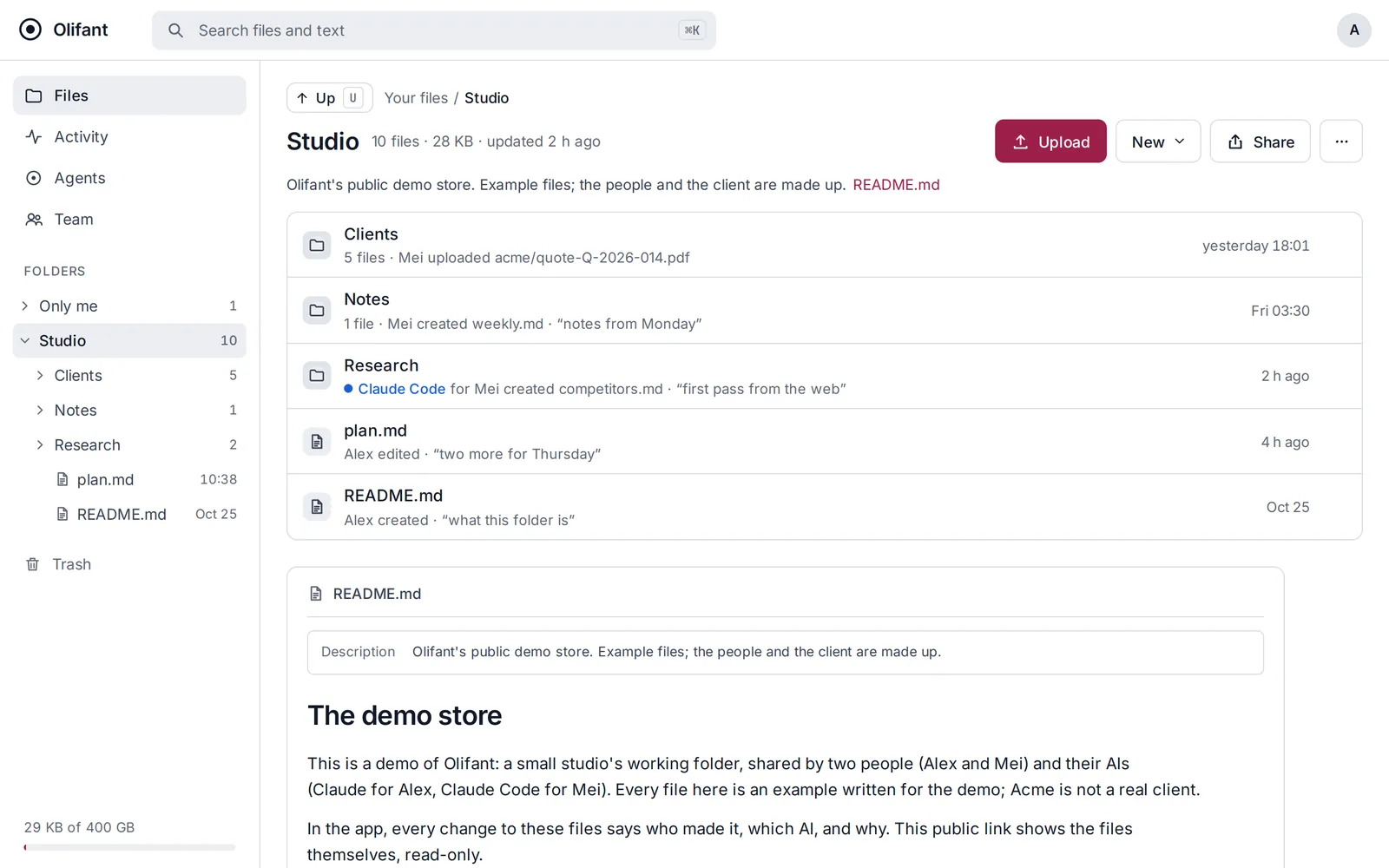
A store we set up so you can see Olifant before you join: a small studio’s working folder with example files, opened through a public, read-only link. The people and the client in it are made up. It shows the files; the app itself, with each change’s author and reason, is in the picture above.
What happens after I join the waitlist?
The button opens an e-mail to support@olifant.io with “Waitlist” in the subject; sending it is how you join. Sign-up is by invitation during early access. There is no card to enter.